Inspired by LifeHacker's "What We Use" series, I wanted to share some of my favorite productivity tools and tricks starting with Chrome extensions.
Xmarks Bookmark Sync - This is absolutely essential for keeping my bookmarks synced across multiple browsers and computers. I adore this extension.
1Password - I know a lot of people prefer to use LastPass (which certainly has many advantages), but I use mainly Mac computers and have found 1Password to be a lot more comfortable for myself. Not only does it store your passwords, but you can set up different profiles and multiple credit cards to autofill. And the password generator is very elegant with easy customization tools. If you're concerned about keeping your passwords in sync on your mobile devices as well (I'm not), definitely give LastPass a look instead.
A Bit Better RTM, Remember the Milk for Gmail, and TaskMilk - I have tested dozens of task manager applications (Wunderkit, Things, and Producteev are some other favorites), but I keep coming back to Remember the Milk. A Bit Better RTM makes the actual RTM site look cleaner while the Gmail plug in has become a convenient replacement for Gtasks, which still lacks too many features for it to be my primary task manager. TaskMilk gives you a quick drop-down look at your RTM tasks.

Boomerang for Gmail - You can send emails at specified later time or "boomerang" them if you want an email to appear back in your inbox if no one has responded after a certain length of time.
BTC Guild - This one definitely isn't for everyone. If you're into Bitcoin as much as I am and you mine for BTC with BTC Guild, this extension has a nice little drop-down menu that displays all your workers with their hashrates and some other data like hourly rewards and 24 hour earnings.
Buffer for Chrome - Many times I will sit down and read several fascinating stories that I have to share with everyone, but since I don't want to clog my Facebook and Twitter feeds at one time I use Buffer to schedule the updates to be spaced out and at peak times for social activity.

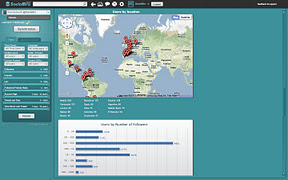
SocialBro - My favorite new social network analytics tool.
Reddit Companion - If you spend a lot of time on Reddit, this is a nice tool that lets you vote, save, and view comments on reddit posts from a small info bar.
Send Using Gmail - Gmail is my default mail client and I prefer to have mailto links open a gmail window rather than a desktop client, thus this extension is a handy shortcut.
TabCloud - Thought I don't find myself using it very often, this theoretically a very nifty extension for saving and reopening sessions if you change to another computer.
Music Plus for Google Music and Turntable.fm Extended - Spotify has become my primary music player, but when I want to go back to Google Music or Turntable.fm (and recently Earbits.com), I love all the extra utility you get from these extensions.

A few others I didn't mention include the following:
Xmarks Bookmark Sync - This is absolutely essential for keeping my bookmarks synced across multiple browsers and computers. I adore this extension.
1Password - I know a lot of people prefer to use LastPass (which certainly has many advantages), but I use mainly Mac computers and have found 1Password to be a lot more comfortable for myself. Not only does it store your passwords, but you can set up different profiles and multiple credit cards to autofill. And the password generator is very elegant with easy customization tools. If you're concerned about keeping your passwords in sync on your mobile devices as well (I'm not), definitely give LastPass a look instead.
A Bit Better RTM, Remember the Milk for Gmail, and TaskMilk - I have tested dozens of task manager applications (Wunderkit, Things, and Producteev are some other favorites), but I keep coming back to Remember the Milk. A Bit Better RTM makes the actual RTM site look cleaner while the Gmail plug in has become a convenient replacement for Gtasks, which still lacks too many features for it to be my primary task manager. TaskMilk gives you a quick drop-down look at your RTM tasks.

Boomerang for Gmail - You can send emails at specified later time or "boomerang" them if you want an email to appear back in your inbox if no one has responded after a certain length of time.
BTC Guild - This one definitely isn't for everyone. If you're into Bitcoin as much as I am and you mine for BTC with BTC Guild, this extension has a nice little drop-down menu that displays all your workers with their hashrates and some other data like hourly rewards and 24 hour earnings.
Buffer for Chrome - Many times I will sit down and read several fascinating stories that I have to share with everyone, but since I don't want to clog my Facebook and Twitter feeds at one time I use Buffer to schedule the updates to be spaced out and at peak times for social activity.

Facebook for Chrome - When I can't resist a peek at my feed...
goo.gl URL Shortener - My preferred URL shortener. It creates a link and goes ahead and copies it for you. Also gives quick access to details and a QR code generator.
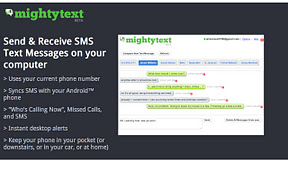
Google Voice (by Google) - Check voicemails and texts quickly with the drop-down menu. Plus, it's great for typing quick texts. I haven't ported my Google Voice number yet so I also use MightyText which fulling integrates text messaging from my cell phone.
InvisibleHand - You're right about to buy a product when BAM! InvisibleHand pops up to tell you that you can get your Blue Yeti microphone for $20 cheaper from another website. Incredibly useful extension that automatically searches a wide variety of sites for better prices.
Reddit Companion - If you spend a lot of time on Reddit, this is a nice tool that lets you vote, save, and view comments on reddit posts from a small info bar.
Send Using Gmail - Gmail is my default mail client and I prefer to have mailto links open a gmail window rather than a desktop client, thus this extension is a handy shortcut.
TabCloud - Thought I don't find myself using it very often, this theoretically a very nifty extension for saving and reopening sessions if you change to another computer.
Music Plus for Google Music and Turntable.fm Extended - Spotify has become my primary music player, but when I want to go back to Google Music or Turntable.fm (and recently Earbits.com), I love all the extra utility you get from these extensions.

A few others I didn't mention include the following:
- After the Deadline
- Chrome Remote Desktop BETA
- Google Chrome to Phone Extension
- Hangout Canopy
- Proxy Switchy!
- SEO for Chrome
- What's the font?
So what am I missing? What are some other extensions that you can't live without?

No comments:
Post a Comment